RIPE DNS Basics

A beginner DNS presentation from RIPE NCC that shows how a simple DNS query is resolved «behind the scenes»…

Announcement follows:

The RIPE NCC is pleased to announce the launch of the first module of our DNSSEC e-learning course, entitled «DNS Basics».

This introductory module explains how DNS works by following a simple query, and can be viewed at:
https://e-learning.ripe.net/training/e-learning/

In the coming months we will be releasing several more modules. Next up are:

Module 2: DNS Vulnerabilities
Module 3: DNSSEC

The RIPE NCC E-Learning Centre is a free-of-charge service available to everyone. If you have any questions, please feel free to contact us at <e-learning@ripe.net>.

Happy Learning,

Rumy Kanis
Training Services Manager
RIPE NCC
CDP for linux

Network Inventory .. What a nightmare to keep up-to-date!

Luckily, if you use Cisco switches, CDPR is here to help you discover where do all your network cables end up.. Simply run it on your linux server, wait a few seconds, and your cisco switch will broadcast the info.

Read about it at http://www.debian-administration.org/article/Where_art_thou_-_CDPR.

The opposite is also useful as well..  A daemon run on linux systems that speaks Cisco Discovery Protocol, thus showing up on your switch’s cdp neighborhood ..

I found cdp-send of cdp-tools that works, but ladvd works better with bonding :)

sw-02>show cdp neighbors
Capability Codes: R - Router, T - Trans Bridge, B - Source Route Bridge
 S - Switch, H - Host, I - IGMP, r - Repeater, P - Phone

Device ID        Local Intrfce     Holdtme    Capability  Platform  Port ID
sw-01            Fas 0/23           150          S I      WS-C3550-1Gig 0/4
router-01        Fas 0/24           158           R       3640      Fas 0/0
linux.local      Fas 0/19           176           H       Linux     eth0

sw-02>show cdp neighbors detail
Device ID: linux.local
Entry address(es):
 IP address: 192.168.1.11
Platform: Linux,  Capabilities: Host
Interface: FastEthernet0/19,  Port ID (outgoing port): eth0
Holdtime : 160 sec

Version :
Linux 2.6.18-92.1.22.el5 #1 SMP Tue Dec 16 11:57:43 EST 2008 x86_64

advertisement version: 2
Duplex: full
Management address(es):

Send mon alerts to twitter

Just a quick proof of concept hack..

I modified twitter-cmdline script to fit mon‘s alert specs..

Download twitter-cmdline-1.03 and place it in /usr/lib/mon/alert.d (or appropriate path of your mon installation).

Then grab twitter.alert and put it there too.

Run twitter.pl and give your twitter credentials (stored in ~/.twitterrc the first time it runs). It’s probably a good idea to create an extra twitter account for this.

Now use twitter.alert in your mon config to send alerts in twitter, where people can follow them!

watch system01
    service disk_root
        interval 5m
        monitor munin.monitor -M df -F _dev_cciss_c0d0p1 -w 90 -c 95 -H
        depend SELF:ping
        period _ANYTIME_
            alertevery 15m summary
            comp_alerts
            alertafter 3
            alert twitter.alert
            upalert twitter.alert

Teleworking

Quoting from «The Pond»  by Rands

Working remotely isn’t a privilege; it’s work. And it’s the same work we’re all doing back at the mothership… fully clothed… in the Pond.

…and if you are a teleworker or manage teleworkers, you should read the comments too!

Integrating Munin with Mon

Munin already integrates with Nagios .. But I didn’t find anything for mon ..

So I hacked check_munin.pl from Nagios Exchange to work with mon ..

Download munin.monitor and place it in mon.d/ of your mon installation.

Now you can monitor ANY munin value using mon.

Use something like the following in your systems_monitor.m4

watch system01
    service disk_root
        interval 5m
        monitor munin.monitor -M df -F _dev_cciss_c0d0p1 -w 90 -c 95 -H
        depend SELF:ping
        period _ANYTIME_
            alertevery 15m summary
            comp_alerts
            alertafter 3
            alert mail.alert _MY_EMAIL_
            upalert mail.alert _MY_EMAIL_
    service toomanyqueuedmails
        interval 5m
        monitor munin.monitor -M sendmail_mailqueue -F mails -w 50 -c 100 -H
        depend SELF:ping
        period _ANYTIME_
            alertevery 15m summary
            comp_alerts
            alertafter 3
            alert mail.alert _MY_EMAIL_
            upalert mail.alert _MY_EMAIL_
    service dnsresponse
        interval 5m
        monitor munin.monitor -M dnsresponse_193.92.110.1 -F avg -w 20 -c 50 -H
        depend SELF:ping
        period _ANYTIME_
            alertevery 15m summary
            comp_alerts
            alertafter 3
            alert mail.alert _MY_EMAIL_
            upalert mail.alert _MY_EMAIL_

Make sure that your MON server’s IP is allowed in munin-node.conf of your munin client.

munin plugin to monitor dns response times

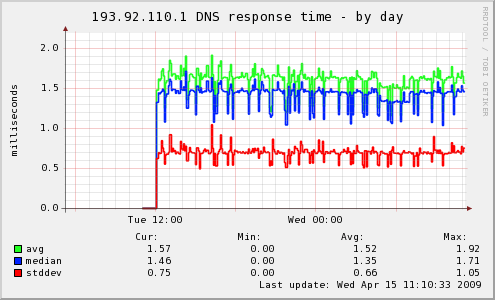
A munin plugin that allows you to monitor the response time of any DNS that allows you to recurse.

dnsresponse_ — it’s a poor man’s smokeping DNS probe :)
(wordpress.com does not allow arbitrary file uploads, so grab it from munin-exhange)

To install it, place it in /usr/share/munin/plugins/ and run «munin-node-configure –shell«.

By default it graphs the Average, Median and StdDev of 20 DNS queries.

sample dnsresponse_ graph